
Tuesday, March 21, 2017
Blog #8
The field trip to the Assistive Technology Lab provided incredible insight into the learning of students with disabilities. We were able to witness several different technologies that could help these students, whether they be blind, color blind, etc. There were braille typewriters, speak-to-text computer programs, special colored keyboards and more. It was really interesting to see all of the tools these students could use, my personal favorite being the special pen that helps record notes.
Bloom's Taxonomy aims to classify learning objectives. These objectives are knowledge, comprehension, application, analysis, synthesis, and evaluation. This can be supported by PowerPoint to an organized and detailed level. Knowledge can be supported, obviously, by putting details, definitions, information, etc. on each slides. This can support comprehension by explaining this information with examples, pictures, graphs, etc. This can then go into application by having slides on possible scenarios the information could be applied to, and analysis can be supported with discussion questions or quiz layouts int he slides. Synthesis can be supported by having slides that compare and contrast things which can be done nicely by having two separate text/picture boxes and other techniques. Lastly, evaluation can be supported in the concluding slide in the form of class feedback.
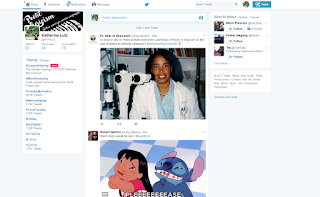
When I think of trends in really anything, the firs thing I think of is https://twitter.com/ because it is the main source for anything trending, including technology trends. I've also been learning a lot more about Twitter because of this class, so it's something I'm now comfortable navigating. Whatever trends you are interested in, there are people to follow for it. This gives the opportunity to receive updates in really any subject, including technology. See a picture of the Twitter site below:

Tuesday, March 7, 2017
Blog #7
Adaptive Technologies refer to technologies that help children with disabilities within the classroom. They are immensely useful and help to keep children all on the same playing field regardless of any disabilities they may have. An example would be talking word processing programs to help children who would not be able to read due to visual impairments. I have not met anyone who has used any of them nor have I used them myself. The challenge I could see would be learning how they all work so that I can implement their use as well as keeping all children on the same page with assignments with this new difference in approach.
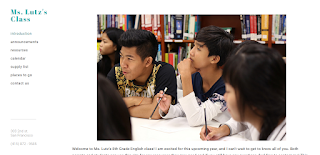
I gained skills with working on the Web Page Assignment in the sense that I now feel like I am able to make a website when before I honestly had no idea. There are a lot of cool tools I can use on Weebly and I really like the flexibility. The only thing I don't really like is that it feels a little generic and like my website just looks like one variation of the pattern Weebly uses since it's all coming from the same format rather than really making my own original page (which would take a lot of other skills as well as investment). I think I can improve it by simply working with it more and figuring out what I may have missed. I can definitely use this in my career to make a simple little website that anyone can access so I can share any information. Here is a link to my website and a screen shot can be found below: http://torisenglishclassroom.weebly.com
Lastly, I've gained skills by working with Diigo as well. I've found new ways to have a community approach to learning and have found a lot of great uses through Diigo that I can apply to my future as both a student and a teacher. It can be helpful in my classroom as students use it to work with each other and I can use it to communicate with them. It can be useful with my own team members because we can multitask and divide tasks to get work done in an efficient manner more successfully. In my own, individual professional efforts, I can more easily highlight and take notes on the computer which is one of the advantages to printing things (except now I don't need to print it).

Tuesday, February 28, 2017
ILP Participation - Technology Sandbox Tour
The field trip to the tech sandbox was an awesome and unique experience. There were many interesting technologies such as a Smart Board, a 3D printer, virtual reality, and more. I think my favorite piece of technology for educational purposes would be the Smart Board. It's great for videos, writing/drawing activities, 3D diagrams, and so much more. I feel like it takes a white board and combines it with a projector in an advanced way that allows for a great deal of student and teacher interaction and keeps the students engaged. I had these when I was in school and they honestly helped a lot with my understanding as well as my presentation skills. I also loved the 3D printer, but I don't feel that as a teacher I would find much use out of it in the classroom. Overall, though, I got to learn a lot about some really cool technologies. Pictured is the Smart Board since I found it most useful for the classroom.


Blog #6
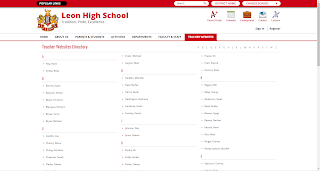
Since I'm interested in Middle/High School level teaching and I wasn't sure where else to start looking, I went to Leon County High School's website. There is a link for "Teacher's Websites" which I followed and browsed through for a little bit. The teachers would each have pages with titles such as "Meet the Teacher," "Announcements," "Assignments," etc. Some teachers had specific pages that were unique to their subject, but for the most part there were a lot of similarities.
I envision myself using Microsoft Office a lot because it's something I already have a general understanding of and I feel like it covers a lot of the bases for what I'd need as a teacher. I could use it for everything from presentations, to newsletters, to tests, etc. I also think it would be very beneficial to my teaching to look into setting up a website. This is something that could help me keep in touch with both parents and students and would make it easy to keep everything organized. Lastly, I would use online tools like Diigo to help my students improve communication with each other and keep organized and informed.
One technology that I definitely think could be used in the classroom would be the Smart Boards. I've seen these used in classrooms and they make it a lot easier to implement creative instruction and encourage student participation. Smart Boards were used when I was still in grade school and they definitely had a significant impact in comparison to regular black boards/white boards or any other less advanced technology.

Tuesday, February 21, 2017
Blog #5
Based on the podcast about Web 2.0 in classrooms, and my experience in this class so far, I think that blogs and Twitter would be the most useful tools. This opens up entirely new and creative opportunities for expression and communication. Blogs are a fun and modern way for students to express their thoughts colloquially and Twitter is a great way for students to communicate about class in a way that almost doesn't even feel like school to them because of the social aspects of it. It also encourages personal development and growth for the students in terms of their individual voices and expression. These resources would also be a great way for the teacher to communicate to the students officially. That being said, I think wikis would be the least useful simply because I don't think they're as fast, simply, and user-friendly of an option as things like Twitter and blogs.
As a teacher, I would definitely utilize Prezi (http://www.prezi.com). This is something I was a little resistant to at first when I encountered it in high school, but the more I've played around with it the more I realize its potential for fun and innovative presentations. It's a great way to organize material and to have it presented in a way that maintains attention. Since it is so visually appealing, I feel that students would be more engaged and would be less likely to get distracted by other things. The alternative, PowerPoint, is something I am obviously more well versed in, but I feel that it comparatively has so many limitations and that using Prezi would be a switch that would benefit my classroom overall by making it easy to incorporate media, organize my information in an aesthetically pleasing way, and more.
I feel that gamification would be the most interesting and successful advancement. This is because I feel like it would be the most engaging with students and it would make school something more entertaining for them. I know that personally, I was more motivated with things like the Oregon Trail game or typing games in school than workbooks (and I definitely remember the things I learned in the former as well). I think because of this it would be the most successful advancement.
Tuesday, February 14, 2017
Blog #4
At first, I was nervous about the Twitter page because I've been avoiding using Twitter for years. I used it in 2009 and that's about it. However, it has been a pretty positive experience so far. It has been fun and I have been learning a lot about how Twitter works in general. I have been communicating with other people in our class about things that are happening in our class, what we're learning, and various jokes throughout the week. Twitter may be beneficial in my career because it is a great way to communicate with people as well as keep people updated on what I'm doing. It's another social media platform that I can use to help display myself in a good light.
The digital divide affects students' success in school for multiple reasons. Firstly, not all students have equal access to technology. Technology can get expensive, especially the more advanced it gets and for many families that is a luxury they cannot afford. Additionally, many students may just not be well equipped in terms of understanding technology and may just not be great with it. Some of the causes of this would be a simple lack of income for students' families as well as a weaker history of technological education (since I want to teach middle or high school, it is possible that some of my students' elementary educations may have technological gaps). I may experience a wide range of technical abilities in my classes due to this and I can combat this by providing as many resources as possible to help fill in these gaps (instructional resources to get students up to speed and access to my help whenever they may need it).
The software I expect to use the most simulations and presentation tools because they will be most relevant to older students' learning (middle and high school aged students will do a lot of presenting and simulations may help them in general). Since my students will be older, I expect less usage of educational games, but they may still be of use in some aspects. The software I would use the least would be Drill-And-Practice software simply because I am very against this style of learning and find it extremely ineffective in most if not all subjects of learning. I think that this would be dull and monotonous, especially for my age group, and that students would simply hate what they're learning.
Tuesday, February 7, 2017
Blog #3
Of the ELA Tech Standards, I feel that I would be most comfortable incorporating the Multimedia informational text standard. This is because I'm a fairly visual learner and feel that the aids mentioned in this section are ones that I would benefit most from personally and therefore I would most easily connect to and be able to carry out for my students. The one that I think would require the most learning would the the Multimedia Science/Technical Subjects one. This is because I am not too skilled in this field and have noticed gaps in knowledge on my part through my studies in the past. That makes me feel that I would need to put work into this area in order to properly use it as a teacher. I have always needed help incorporating data into these graphs and tables before so I need to fine tune that.
I feel that I would most use blogs and wikis for my class as a teacher. I am an English major, so I would most likely teach in this field. I also prefer middle or high school aged students, so I think that blogs and wikis would be effective in aiding the material we would be covering. I think the middle/high school age group is also one that would best fit the digital citizenship guideline stating that "Student participation in the community is meaningful, appropriate, and on topic and advances the community as a whole." The students are old enough at this point to be held accountable for this and I think it is relevant to blog and wiki usage.
Honestly, a lot of the newsletter assignment was a refresher for me because I remember learning a lot of it when I was little in Computer Class and we were learning about Microsoft Office Programs. It was good to review it all, though, because I realized that I really forgot a lot of things like borders and formatting. I really liked the opportunity to learn how to format a newsletter like this and feel it can be improved next time through more effort on the shading of boxes and using nicer pictures. I definitely learned useful things for my career here in that I will be able to make newsletters like this in any field.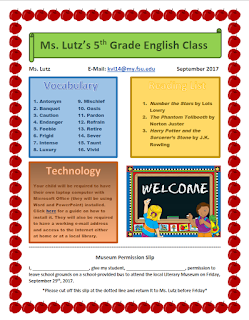

Subscribe to:
Posts (Atom)